NoonFox Explorations
← NoonFox tracker

Version 3 · 2026-07-18 · The Hybrid

Direction decided

Two on-ramps.
One aha.

v1 sold the app. v2 skipped the selling. v3 stops choosing: open camera-first by default — the reflex, the on-brand speed — but leave a one-tap "show me what this does" door into v1's guided deck for the skeptic who needs the pitch first. Both lanes merge at the same beat: the first snap, the first find.

This version takes a position on all four open questions — direction, paywall, segmentation, and the "I lose things constantly" brain. The recap is right below.

The shared payoff both lanes drive toward — snap → the fox reads it → filed

Default lane · camera-first

Open straight into the lens

No deck, no account. A single primed line, the OS camera prompt with its reason already given, and you're snapping in ~4 seconds. This is what most people get.

for: warm App-Store traffic · the reflex user · the ADHD brain
Escape lane · guided

"Show me what this does" →

A persistent, low-key door on the camera screen. Tap it and you drop into v1's short cinematic sell — the magic demo, the highest-anxiety use-cases, family sharing — then rejoin the camera exactly where the default lane is.

for: the skeptic · the researcher · anyone not ready to point a camera yet
both lanes converge at the first snap

What we decided · 2026-07-18

The four calls, and why

Everything in v3 follows from these. Three matched the research recommendation; on the ADHD persona you went further than "same flow, different voice."

01 · Direction
Hybrid — camera-first + guided escape
Keep v2's ~4-second time-to-aha as the default, but don't lose the skeptic who needs the pitch. The escape costs one extra screen state, not a second product.
02 · Paywall
Reverse trial — gate after the aha
NoonFox's value compounds (worthless at item #1, sticky at #50). Charging on open sells a promise; gating after the first find sells a proof. Card-free entry keeps the referral loop alive.
03 · Segmentation
Ship it — 4 options + escape
"What brings you?" lifts activation (+7.6pts, Headspace) — but only if each answer really changes seeded locations, sample search, or framing. Four distinct branches is the most we can make genuinely different.
04 · ADHD persona
Its own dedicated path
"I lose things constantly" doesn't just get different copy — it gets a different flow: faster, paywall pushed further out, framed as capacity not gamification. The segmentation answer routes straight into it.

The flow · fork → merge → one spine

How the two lanes actually run

The only thing that forks is the first ~15 seconds. Everything after the first snap is one shared spine — so you build and maintain almost exactly one flow, plus a short optional deck.

Default · camera-first (most users)
Escape · "show me what this does"
Open
Live camera, guest mode
One floating line primes the permission inline: "Point at anything you don't want to lose." Then the OS prompt, reason already given.
Always visible
A quiet "Show me what this does" link
Bottom of the camera screen. The off-ramp for anyone not ready to shoot — never a modal, never in the way.
Welcome
"Never lose anything again."
One outcome promise. Then the autoplay snap→AI demo (the beat up top), ≤3 highest-anxiety use-cases, and the free family-sharing hook.
Rejoin
"Alright — point your camera."
The deck dead-ends into the exact same camera screen. No dead ends, no separate signup. The skeptic is now where the default user already was.
↓ both lanes merge — one shared spine ↓
Beat A · the aha
First snap → items file themselves
The fox reads the shelf; chips pop in with locations. "Filed. That's the whole app."
Beat B · close the loop
One search, on what they just snapped
"Now ask where it is." Pre-filled search lands on their own item. Snap→find closed in session one.
Beat C · seen
One question: "What brings you?"
4 options + escape. Routes the whole rest of the run — and sends the ADHD answer to its own path.
Beat D · the ask
Save + reverse trial
Only now: one-tap sign-in to save across phone & family, then 7-day full trial, no card.

Why this beats picking one: the clean camera-first (v2) bounces the skeptic with nowhere to go; the clean guided flow (v1) taxes the 4-second reflex user with a deck they'd skip. The hybrid lets each self-select and still converges on one spine — so the extra cost is a link and a short deck, not a forked product.


The dedicated path · "I lose things constantly"

A different flow, not just a different voice

You chose a dedicated path over shared-flow-with-copy-swaps. That's the right call if it earns its keep — so here's what actually changes end to end. Lead with the lived symptom, never the diagnosis (catch the large undiagnosed majority), and treat setup as the enemy their brain came here to escape.

01

Named, not diagnosed

"Your brain wasn't built to hold 200 objects. This one is." No "ADHD," no clinical framing — just the felt problem, out loud.

02

Straight to the streak

Skip the use-case carousel entirely. "Snap 3 things you've lost this week." Momentum before thought — the anti-setup.

03

Relief, not reward

Payoff copy is capacity, not points: "That's 3 fewer things to hold in your head." No streaks, no badges — gamification can shame this brain.

04

The wall waits longer

Reverse trial pushed further out than the default lane. Let the relief compound first; frame premium as "never lose the thread," not "unlock features."

05

Forgiving empty state

Seeded ghost item + a re-entry that never scolds a gap. Coming back after two weeks looks identical to coming back tomorrow.

BeatDefault laneADHD dedicated path
FramingOutcome promise ("never lose anything")Lived symptom, named aloud changed
PaceSnap → find → question → askSnap ×3 immediately; questions deferred faster
Payoff copy"Filed to your garage.""3 fewer things to hold in your head." capacity
GamificationLight streak nudge OKQuiet — no streaks/badges by default removed
Paywall timingAfter first find (Beat D)Pushed further; relief compounds first deferred
Re-entryStandard empty stateNever scolds a gap; shame-free return changed
The honest cost of a dedicated path: it's a second flow graph to build, instrument, and keep in sync — the trade-off I'd flagged. It's worth it only if this segment converts or retains measurably better than the default lane with copy-swaps. Ship it behind the segmentation answer, but instrument it as its own funnel from day one so you can prove (or kill) the extra surface area on D30, not vibes.

The question · Beat C

One question, four real branches

One question · single-select

What brings you to NoonFox?

🏠 Organize my whole home 🔧 Garage / a storage unit 🧠 I lose things constantly 📦 Moving / packing Just exploring →

The +7.6pt activation lift (Headspace) comes from feeling seen — but that's an activation number, not a retention one. So the rule is: every answer must change something real, or it's fake personalization that costs a screen and buys nothing. Here's the contract each branch signs:

🏠
Whole home
Default. Seeds home locations (entry, kitchen drawer, closet). Sample search: "passport."
🔧
Garage / storage unit
Seeds a garage/unit tree (pegboard, bins, shelves). Sample search: "the 10mm socket." Hero leans tools & parts.
📦
Moving / packing
Seeds box-based locations ("Box 12 · kitchen"). Sample search: "which box are the chargers in?"
🧠
I lose things constantly →
Not a place — a need-state. This one routes to the dedicated ADHD path above (faster pace, capacity framing, deferred wall), falling back to home locations for the tree.
·
Just exploring (escape hatch)
Empty/skip → silently defaults to Home. Never a required gate.

The paywall · Beat D

Reverse trial, placed on the spine

Decided: no pay-to-open. The wall sits on the shared spine, after the first find — the earliest moment the value is a proof, not a promise. Card-free 7-day full-premium trial, downgrading to a limited free tier (not to nothing), so the catalogue survives and keeps working the referral loop.

Price around the Cal AI band (~$40–70/yr, annual default). Judge every A/B on revenue-per-install and D30 — never the headline conversion %, which the famous "hard paywalls convert 5.5×" stat quietly games by only counting people already willing to pay.

You'd been leaning hard-gate. The one number that would justify flipping back: if a hard-gate A/B beats reverse-trial on revenue-per-install AND holds D30, take it. Build the wall as a server-controlled placement so this is a config flip, not a re-release.
The decision

Reverse trial — gate after the aha

  • ✓ Value first, then loss-aversion converts
  • ✓ Catalogue survives → habit + word-of-mouth
  • ✓ No card friction on the way in
  • ✓ On the ADHD path, pushed even further out
Kept as the A/B challenger

Hard gate

  • ✗ Charges before any value is felt
  • ✗ Starves the organic / referral loop
  • · Revisit only if it wins on RPI + D30

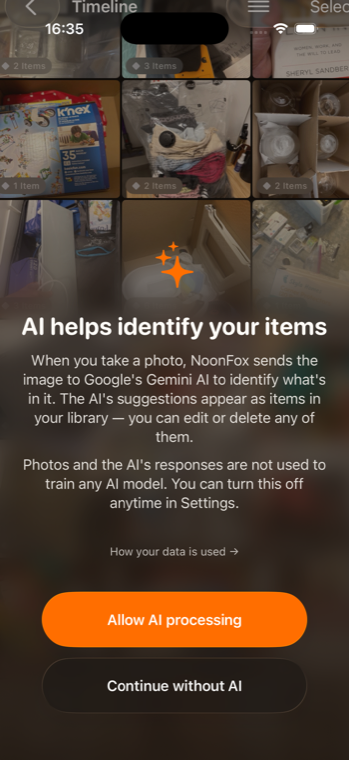
Actual app · real captures

The lane both roads lead to

Not mockups — a real screen-recording and screenshots from NoonFox running today. The whole hybrid exists to get someone to their own version of these, fast.

Live capture

Actual screen-recording — a cold launch into a real, full Timeline

Actual appNoonFox Detected Items — real screenshot
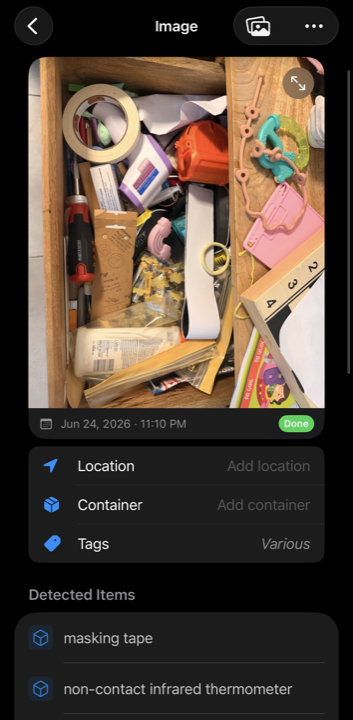
One snap → AI's Detected Items (the aha)
Live captureNoonFox Search — real screenshot
Beat B — search "mouse" → magic mouse
Live captureNoonFox AI consent — real screenshot
The primed AI-consent screen

Still owed · the money-shot capture

The one capture not yet in hand: a controlled camera → shutter → items pop in recording of the real app — the aha, filmed. Status, honestly:

Have
A signed-in throwaway account with a seeded Timeline on the booted sim, plus the cold-launch recording, real Detected-Items, Search, and AI-consent screens (all above).
Blocker
The iOS simulator has no real camera feed — it can't photograph a real shelf, so a sim "snap" can't produce a meaningful recognition. The honest money-shot needs a physical device: real camera → real objects → real detection.
Next
Fastest path is a ~2-minute capture on Amit's own iPhone (screen-record on, snap a real drawer, let items file in). Alternatively a sim-only UI-motion capture (shutter + the app's own recognition animation over the built-in scene) — honest as UI, but not a real recognition. Recommend the device capture.

See how we got here — the two directions this synthesizes →

v1 · Guided v2 · Camera-First All versions